
Make your school information session go smoothly with OneScan!
School information sessions are a huge undertaking every year. Using OneScan makes the process of registering participants incredibly smooth! We'll explain everything from advance preparations to the flow of the day and the benefits.
What is OneScan?
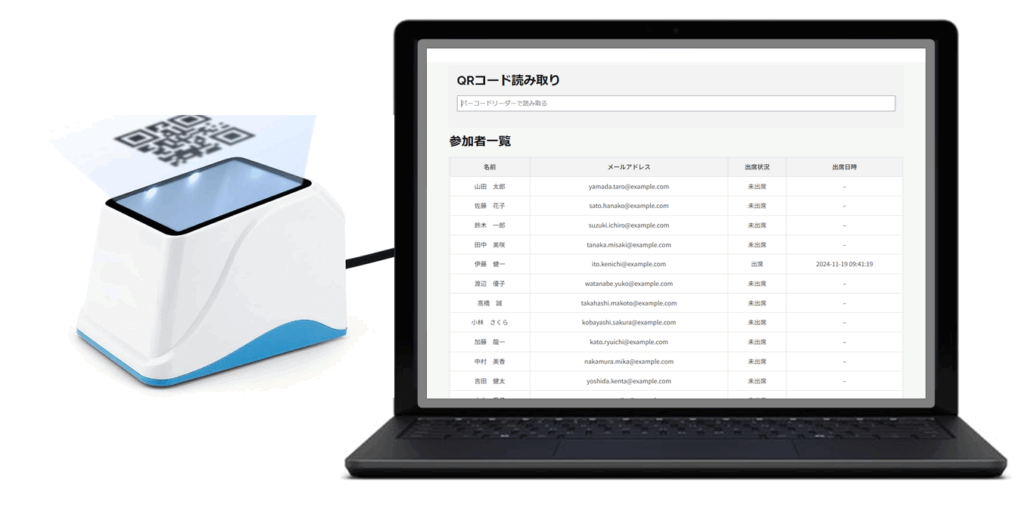
OneScan is a system that streamlines participant check-in by scanning QR codes. If you register participant information in advance, you can complete check-in smoothly by simply scanning the QR code on the day of the event. This system is environmentally friendly as it eliminates the need for paper reception slips.
Advance preparation
1. Registering participant information
To use OneScan, you must first register participant information in the system. You can also register them all at once using an Excel file. In addition to basic information such as name, address, and phone number, you can also collect questionnaires about school information sessions in advance.
2. Issuance of QR code
Once participant information is registered, OneScan will automatically generate a unique QR code for each participant. Send this QR code to participants in advance via email or other means.
3. Preparing the reception terminal
On the day, you will need to prepare a tablet or smartphone to read the QR code, as well as the OneScan app. Having multiple devices on hand will make the check-in process even smoother.
Flow of the day
1. Participants arrive and scan their QR codes
When participants arrive, scan their QR code with the OneScan app, and their information will be automatically recorded in the system.
2. Confirmation of participant information
OneScan instantly displays participant information based on the information in the QR code you scan, allowing you to enter or verify additional information if needed.
3. Reception complete
Once the participant information has been confirmed, the registration will be completed. If necessary, we will distribute materials and provide guidance to participants.
Benefits of using OneScan
1. Shortening reception hours
Compared to handwritten reception slips, this method significantly reduces reception time. Participants can also complete the procedure smoothly, which also leads to increased satisfaction.
2. Reduction in personnel
This reduces the number of staff required for reception. Reception can be done efficiently with a small number of people.
3. Streamlined data management
Participant information is automatically recorded in OneScan, making data management easy and convenient for later analysis.
4. Environmental Consideration
This eliminates the need for paper receipts, reducing the burden on the environment.
summary
OneScan is a powerful tool for smoothly managing the registration process for your school information session. By preparing thoroughly in advance and understanding the flow of the day, you can ensure an efficient and comfortable information session. Make use of OneScan to make your school information session a success!