
Streamline club activity trial sessions with OneScan!
Are you struggling to keep track of participants at your club activity trial sessions? With OneScan, you can distribute participants' QR codes in advance and simply scan them on the day! You can track participation in real time, ensuring efficient operation. We'll explain everything from preparing for the trial session to the flow on the day and how to use it!
Challenges in running a trial event
Club activity trial sessions require the ability to accommodate a large number of participants. Conventional methods often involve paper-based registration and handwritten attendance records, which pose the following challenges:
- It takes time to identify participants
- It takes time to count
- Managing participant information is complicated
- It is difficult to grasp participation status in real time
Make your trial session go smoothly with OneScan!
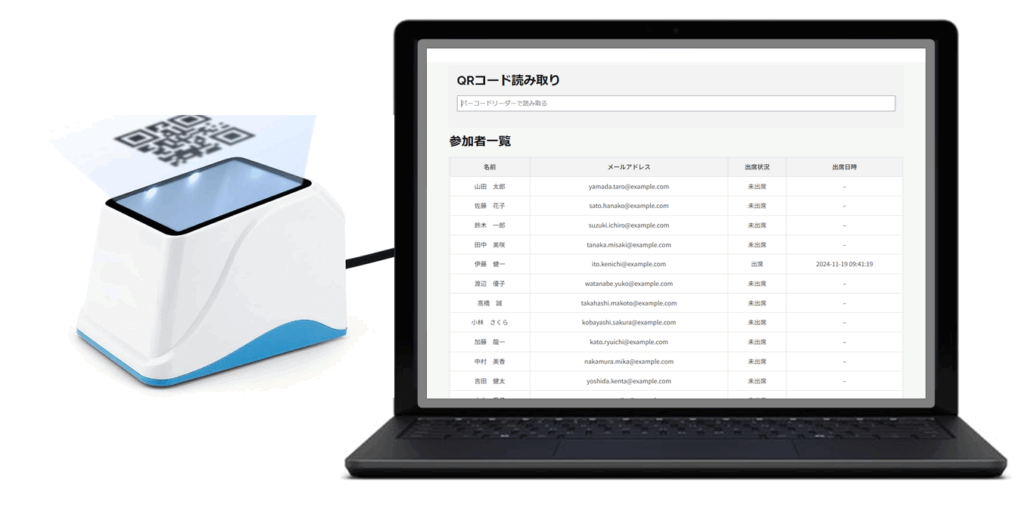
OneScan is a participant management system that uses QR codes. By distributing QR codes to participants in advance and scanning them with the OneScan app on the day of the event, you can easily track attendance.
Benefits of OneScan
- Time Saving: This will streamline the check-in process for participants and significantly reduce the time required.
- Exact tally: This prevents human error and allows you to accurately count the number of participants.
- Real-time understanding: Participation status can be checked in real time, making operations more efficient.
- Data Management: Participant data is managed digitally, allowing for secure and efficient storage.
- Smooth communication: You can also contact participants efficiently.
Flow of the OneScan trial session
preparation
- Download the OneScan app and create an account.
- Make a list of students who will be attending the workshop.
- Generate QR codes with OneScan and distribute them to each student (email, LINE, etc.).
On the day
- At the reception, scan the QR code from the participant.
- Check real-time attendance status with the OneScan app.
- After the trial session, we will compile participant data and prepare a report if necessary.
Use Cases
OneScan is used in a variety of club activities. For example, the soccer club uses it to keep track of participants in trial sessions, and the basketball club uses it to manage practice attendance.
Other use cases
- Information Session
- training camp
- game
How to install OneScan
Getting started with OneScan is easy. Simply download the app, create an account, and you're ready to go. For detailed instructions, please visit the official OneScan website.
summary
By using OneScan, you can efficiently manage your club activity trial sessions and smoothly respond to participants. We encourage you to introduce OneScan and use it to revitalize your club activities.